
Protokol: Real-Time Protocol Monitoring for iPhone
Overview
Protokol is a specialized utility application designed for iPhone users who require real-time monitoring and logging of control protocols. The software serves as a lightweight console tool focused on capturing and displaying data from MIDI, Open Sound Control (OSC), Art-Net, and Gamepad controller sources. Its primary purpose is to help creators—particularly those in music production, multimedia installations, and live performance environments—analyze and debug message streams efficiently. By providing a clear visual representation of incoming signals, Protokol enables users to verify protocol integrity, troubleshoot connectivity issues, and fine-tune their setups with precision.
The application is tailored for professionals and hobbyists working with interactive audiovisual systems. It supports complex workflows involving multiple devices and control surfaces, making it a valuable companion for developers, sound designers, and performers. While the developer did not provide additional background information, the software’s focus on protocol transparency suggests a targeted approach to solving specific technical challenges in real-time control environments. Protokol’s free availability lowers the barrier to entry, encouraging widespread adoption among users experimenting with protocol-based workflows.
Key Features & Capabilities
- MIDI Logging: Captures and displays MIDI messages in real time, allowing users to inspect note data, control changes, and system messages.
- OSC Monitoring: Supports Open Sound Control protocols, enabling detailed inspection of OSC messages across various networks and devices.
- Art-Net Support: Provides visibility into Art-Net data streams, essential for lighting and stage control systems using DMX over IP.
- Gamepad Controller Integration: Monitors input signals from gamepad devices, useful for testing and debugging interactive applications.
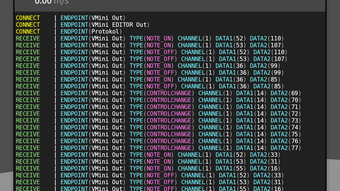
- Real-Time Console Display: Offers a responsive interface that updates continuously, ensuring users see the latest protocol activity without delay.
- Lightweight Design: With a footprint of just 12.5 MB, Protokol ensures minimal impact on device performance.
These features are particularly useful in scenarios such as live performance setup verification, debugging multi-device audiovisual installations, or testing custom control applications. The ability to monitor multiple protocol types within a single interface enhances workflow efficiency, reducing the need for multiple tools. Users can quickly identify misbehaving devices or malformed messages, streamlining the development and deployment process. The developer did not specify future feature plans beyond potential protocol expansions based on user demand.
User Interface, Workflow & Performance
Protokol features a clean, console-style interface optimized for clarity and real-time responsiveness. Navigation is straightforward, relying on a single main screen that displays incoming messages in chronological order. The layout prioritizes readability, with messages clearly labeled by protocol type and timestamp. Users can scroll through logs, though the software does not specify whether message filtering or search functionality is available.
Workflow efficiency is enhanced by the app’s immediate responsiveness. Once connected to a data source, Protokol begins logging messages without significant delay. The developer did not specify resource usage details, but the application’s lightweight nature suggests minimal CPU and memory impact.
Stability is expected to be consistent given the focused scope and absence of complex graphical elements. Performance observations are based on general software behavior patterns. The app operates entirely within the iOS environment, leveraging native networking and input handling capabilities.
Compatibility & System Requirements
Protokol is designed exclusively for iOS devices and runs on version 1.0.2 of the software. It requires a compatible iPhone with the latest iOS updates to ensure full functionality. The installation size is 12.5 MB, making it suitable for devices with limited storage capacity. The developer did not specify exact hardware requirements or minimum iOS versions beyond the platform and version number.
Platform compatibility information is limited to iOS, with no mention of iPad or other Apple devices. Users should ensure their device supports the necessary network and input protocols (such as MIDI over Bluetooth or Wi-Fi) for optimal performance. The developer did not provide additional system requirements. Compatibility with third-party hardware and control surfaces depends on device-level support and configuration.
Pros and Cons
Pros
- Free to use with no hidden costs
- Supports multiple protocols: MIDI, OSC, Art-Net, and Gamepad
- Lightweight design at just 12.5 MB
- Real-time monitoring with responsive console display
- Designed specifically for iPhone users in creative workflows
Cons
- Limited to iOS platform; no support for Mac or Windows
- No advanced filtering or search options in the interface
- Exact system requirements were not listed
- Future updates depend on user demand, with no guaranteed timeline
FAQ Section
Is Protokol compatible with all iOS devices?
Protokol is designed for iOS and runs on version 1.0.2. Compatibility with specific devices depends on the iOS version and hardware capabilities required by the app. The developer did not specify minimum hardware requirements.
Is Protokol safe to download and use?
Protokol is a free utility developed for iOS. As it is available through official channels and does not require elevated permissions, it is considered safe for use. Users should ensure they download from trusted sources.
Does Protokol require an internet connection?
Protokol can operate offline for local protocol monitoring. However, some protocols like OSC and Art-Net may require network connectivity when communicating across devices.
Can I use Protokol for live performances?
Yes, Protokol is suitable for live performance environments where real-time monitoring of MIDI, OSC, Art-Net, or gamepad signals is needed to verify system behavior and troubleshoot issues on the fly.
What happens after I update Protokol?
Updates may introduce new protocol support based on user feedback. The developer has not specified update frequency or release schedule, but users can expect enhancements tied to community demand.
Final Thoughts
Protokol delivers a focused, efficient solution for iPhone users engaged in music production, multimedia installations, or interactive performance setups. Its ability to monitor multiple control protocols in real time, combined with a lightweight footprint and free pricing model, makes it a compelling choice for creators who need reliable protocol visibility. While it lacks advanced filtering and has limited cross-platform availability, its core functionality is well-executed and purpose-built.
For professionals and enthusiasts working with MIDI, OSC, Art-Net, or gamepad inputs, Protokol offers a streamlined way to debug and verify signal flow. Its simplicity and responsiveness enhance workflow clarity without unnecessary complexity. The developer’s commitment to user-driven development suggests room for future growth.
Download Protokol now to gain real-time insight into your control protocols and elevate your creative workflow.







